

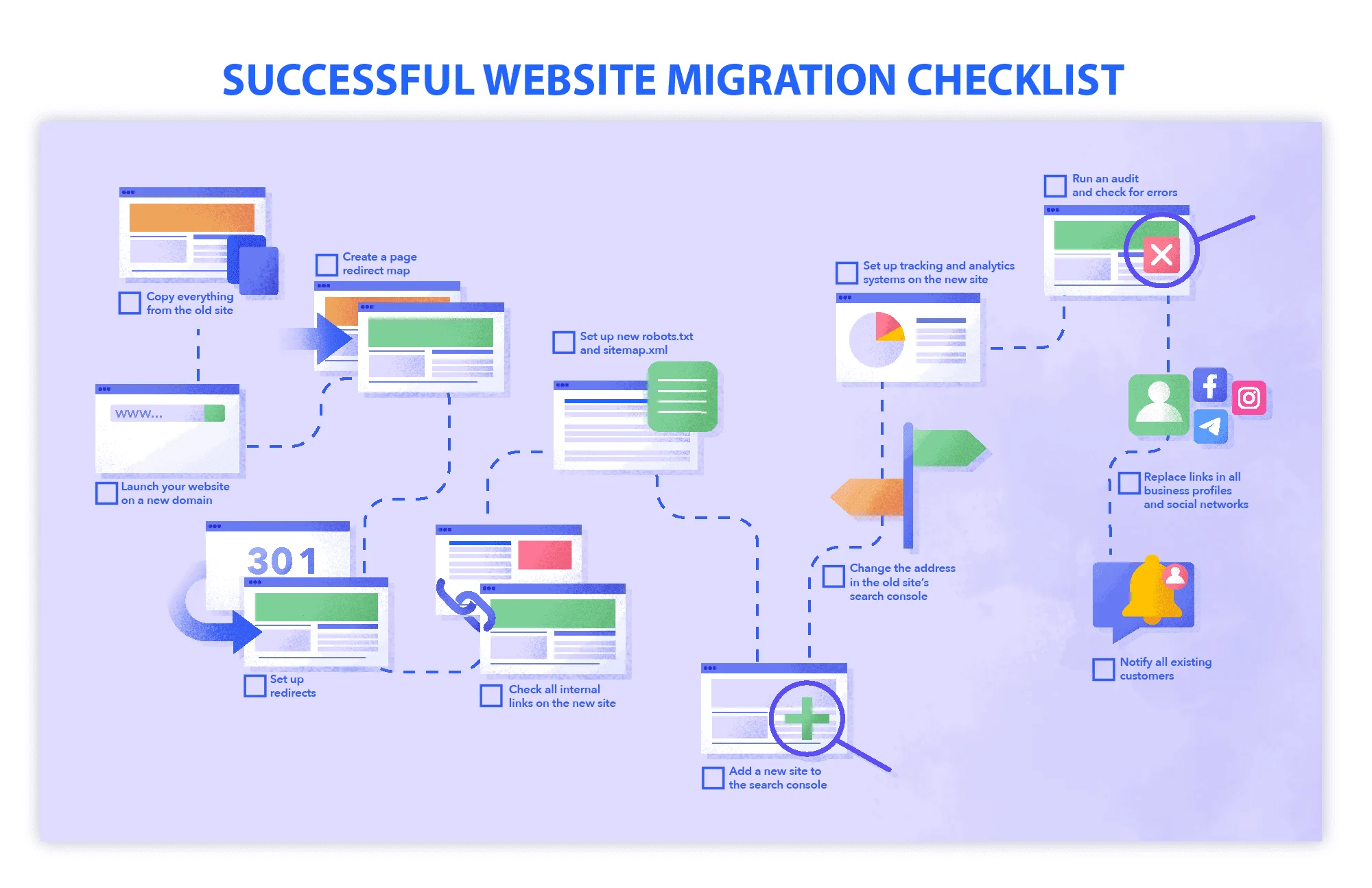
Domain Migration Checklist: The Ultimate SEO-Safe Website Move Guide
Website migration is one of the most sensitive SEO operations any business can perform. A single mistake during a domain migration can result in traffic loss, ranking drops, broken pages, indexing issues, and lost backlinks.
Most migration guides online focus heavily on redirects and technical audits. While those are important, many fail to explain the real-world operational problems businesses face during migration. They also overlook domain warming, stakeholder communication, brand mention updates, migration timing strategies, rollback planning, and user-experience preservation.
This guide from Vantagesresourcehub covers the missing pieces most migration articles ignore. You will learn not only how to migrate a domain safely but also how to protect your SEO authority, customer trust, analytics accuracy, and long-term organic growth.
Industry experts consistently emphasize that failed migrations usually happen when businesses attempt multiple changes simultaneously, such as redesigning the website, changing URLs, and migrating domains at the same time.
What Is a Domain Migration?
A domain migration happens when a website moves from one domain name to another. Examples include:
- Rebranding a company
- Moving from
.netto.com - Merging websites
- Changing international domains
- Moving from HTTP to HTTPS
- Consolidating subdomains
A domain migration affects:
- SEO rankings
- Backlinks
- Crawlability
- Indexation
- Analytics data
- User trust
- Conversion tracking
If executed poorly, it can damage years of SEO growth.
Why Most Domain Migration Checklists Fail
After analyzing top-ranking migration guides, one major pattern became clear: most focus only on technical SEO basics.
Here are the important areas many articles barely discuss:
- Preparing the new domain before migration
- Domain reputation and historical spam checks
- Brand mention updates across the web
- Communication planning for customers
- Rollback strategies if migration fails
- Migration timing based on traffic patterns
- Monitoring branded search behavior
- Preserving conversion tracking integrity
- Team coordination and migration ownership
- Managing redirects for media files and PDFs
- Maintaining business citations and local SEO signals
These overlooked elements often determine whether a migration succeeds or fails.
Complete Domain Migration Checklist
Phase 1: Pre-Migration Planning
This is the most critical stage of the migration process.
1. Define the Purpose of Migration
Before touching anything technical, clarify why you are migrating.
Common goals include:
- Rebranding
- Better domain authority
- Shorter domain name
- International expansion
- Platform upgrades
- Security improvements
Your migration strategy should align with your business goals.
2. Audit the Existing Website
Conduct a full audit of your current website before migration.
Document:
- Indexed pages
- Top-performing pages
- Organic traffic pages
- Backlink-heavy pages
- Conversion pages
- Existing redirects
- Broken pages
- Canonical tags
This creates your benchmark for comparison after migration. Multiple migration experts strongly recommend benchmarking rankings, backlinks, and crawlability before launch.
3. Check the History of the New Domain
This step is often ignored.
Before using a new domain:
- Check if it was previously penalized
- Review historical content
- Analyze toxic backlinks
- Inspect spam history
- Verify indexing status
Migrating to a previously abused domain can create SEO problems instantly.
4. Warm Up the New Domain Before Migration
One major insight missing from many guides is domain warming.
SEO professionals frequently recommend preparing the new domain weeks before migration.
Best practices include:
- Publishing branded landing pages
- Allowing Google to crawl the domain
- Verifying the domain in Search Console
- Creating initial backlinks
- Establishing topical relevance
This helps search engines trust the new domain faster.
5. Avoid Combining Multiple Changes
This is one of the most repeated warnings from experienced SEO professionals.
Do NOT combine:
- Domain migration
- Website redesign
- URL restructuring
- Major content changes
- CMS migration
Handle one major change at a time.
A domain-only migration reduces confusion for search engines.
Phase 2: Technical SEO Preparation
6. Create a Full URL Mapping Document
Map every old URL to its new equivalent.
Your redirect sheet should include:
| Old URL | New URL | Redirect Type |
|---|---|---|
| oldsite.com/page-a | newsite.com/page-a | 301 |
| oldsite.com/blog/post | newsite.com/blog/post | 301 |
Avoid redirecting multiple pages to the homepage.
7. Implement 301 Redirects Correctly
Permanent redirects transfer SEO value and user signals.
Important redirect rules:
- Use 301 redirects only
- Avoid redirect chains
- Avoid loops
- Redirect image URLs
- Redirect PDFs and media files
- Redirect old blog posts individually
Experts repeatedly emphasize that redirect errors are among the biggest migration risks.
8. Update Canonical Tags
Many migrations fail because canonicals still point to the old domain.
Update:
- Self-referencing canonicals
- Product canonicals
- Paginated canonicals
- International canonical references
Incorrect canonicals can delay indexing on the new domain.
9. Update Internal Links
Do not rely on redirects internally.
Update all:
- Navigation links
- Footer links
- Breadcrumbs
- Contextual links
- XML sitemap URLs
- Image references
Internal redirects waste crawl budget and slow indexing.
10. Prepare XML Sitemaps
Create fresh XML sitemaps containing only the new URLs.
Include:
- Pages
- Images
- Videos
- News content if applicable
Submit the new sitemap immediately after launch.
11. Review Robots.txt
Ensure your new domain is crawlable.
Common migration mistakes include:
- Accidentally blocking crawlers
- Disallowing staging folders incorrectly
- Leaving noindex directives active
Always verify robots.txt before launch.
12. Test the Staging Environment
Before launch:
- Crawl the staging site
- Check broken links
- Test redirects
- Verify page speed
- Validate structured data
- Confirm mobile usability
Top migration guides consistently recommend full staging audits before deployment.
Phase 3: Analytics & Tracking Preparation
13. Backup Analytics Data
Export:
- Organic traffic reports
- Conversion reports
- Keyword rankings
- Landing page performance
- Historical data
This helps identify migration-related traffic losses later.
14. Update Tracking Codes
Verify:
- Google Analytics
- Google Tag Manager
- Conversion pixels
- Heatmaps
- CRM integrations
- Event tracking
Broken analytics during migration creates reporting gaps.
15. Configure Search Console Properly
Set up:
- New property verification
- XML sitemap submission
- Change of Address tool
- Performance tracking
Several SEO professionals specifically highlight the importance of the Change of Address tool.
Phase 4: Launch-Day Checklist
16. Launch During Low-Traffic Hours
Timing matters more than most guides explain.
Choose:
- Low traffic periods
- Midweek launches
- Business support availability
Avoid:
- Major holidays
- Sales campaigns
- Peak seasonal traffic
This minimizes risk exposure.
17. Monitor Redirects Immediately
Right after launch:
- Test high-traffic URLs
- Verify top backlinks
- Check product pages
- Validate category pages
Pay special attention to revenue-driving pages.
18. Check Indexation Signals
After launch:
- Submit sitemaps
- Request indexing
- Review crawl reports
- Monitor crawl errors
Search engines need clear signals quickly.
19. Test Website Performance
Migration sometimes affects:
- Hosting speed
- CDN configurations
- Cache settings
- Image delivery
- JavaScript rendering
Poor page speed can amplify ranking drops.
Phase 5: Post-Migration SEO Monitoring
20. Track Rankings Daily
For the first 4–6 weeks:
- Monitor keyword rankings
- Track branded keywords
- Watch traffic trends
- Analyze landing pages
Temporary fluctuations are normal, but severe drops require investigation.
21. Monitor 404 Errors
One of the most important post-launch tasks is monitoring crawl errors.
Fix:
- Missing redirects
- Broken media URLs
- Internal broken links
- Incorrect canonical references
22. Update Important Backlinks
Another frequently overlooked step is manually updating backlinks where possible.
Prioritize:
- Social profiles
- Business listings
- Partner websites
- Author bios
- Press mentions
- Directory listings
Direct backlinks are stronger than redirected backlinks.
23. Monitor Branded Searches
Watch for:
- Branded keyword drops
- Confusion between domains
- Duplicate indexed pages
- Brand mismatch issues
This is especially important during rebranding migrations.
24. Keep the Old Domain Active
Do not let the old domain expire.
SEO professionals often recommend keeping it active for years.
Maintain:
- SSL certificates
- Redirects
- DNS records
This preserves link equity and prevents hijacking.
Advanced Domain Migration Tips Most Articles Ignore
Create a Rollback Plan
If migration causes major issues:
- Restore backups quickly
- Reverse DNS changes
- Recover analytics setups
- Pause problematic redirects
Every enterprise migration should include rollback preparation.
Assign Clear Team Ownership
Define responsibilities for:
- SEO
- Development
- Analytics
- Content
- QA
- Marketing
Migration confusion often comes from unclear ownership.
Communicate the Migration Publicly
Inform:
- Customers
- Subscribers
- Partners
- Vendors
Use:
- Email announcements
- Social posts
- Press releases
- Website banners
This reduces trust issues during rebranding.
Monitor Server Logs
Server logs reveal:
- Crawl behavior
- Bot access issues
- Redirect frequency
- Crawl budget waste
Very few migration guides discuss log analysis, but it provides critical insights.
Preserve Local SEO Signals
If your business relies on local SEO:
Update:
- Google Business Profile
- Local citations
- Directory listings
- NAP consistency
- Review platforms
Ignoring local SEO can hurt local visibility after migration.
Common Domain Migration Mistakes
Redirecting Everything to the Homepage
This confuses search engines and users.
Every important page should redirect to the closest relevant equivalent.
Removing Old Content Too Early
Keep valuable content live whenever possible.
Removing pages immediately after migration often causes traffic loss.
Forgetting Image SEO
Image URLs also carry SEO value.
Redirect:
- Images
- PDFs
- Download files
- Video assets
Ignoring Mobile Testing
Always verify:
- Mobile usability
- Responsive layouts
- Mobile speed
- Touch functionality
Mobile indexing is critical for SEO.
Domain Migration Recovery Expectations
Even successful migrations may experience:
- Temporary ranking fluctuations
- Crawl volatility
- Delayed indexing
- Traffic shifts
Well-planned migrations usually stabilize faster than rushed implementations. Multiple migration studies emphasize that preparation directly affects recovery speed.
Final Thoughts
A successful domain migration is not just about redirects. It requires strategic planning, technical precision, SEO preservation, analytics continuity, and communication management.
The biggest lesson from analyzing leading migration resources is simple:
Most failed migrations happen because businesses rush the process or combine too many changes at once.
If you approach migration methodically, monitor carefully, and prioritize SEO continuity, you can preserve rankings, traffic, and authority while transitioning to a stronger digital foundation.
At Vantagesresourcehub, we recommend treating every domain migration as a high-risk SEO project that deserves careful planning and phased execution.
FAQs
How long does a domain migration take to recover?
Most websites begin stabilizing within a few weeks, but full recovery can take several months depending on site size, crawl frequency, and migration quality.
Will I lose SEO rankings after a domain migration?
Temporary fluctuations are common, but proper redirects, crawlability, and monitoring can significantly reduce ranking losses.
Should I redesign my website during domain migration?
No. It is best to avoid redesigns, URL restructuring, or major content changes during a domain migration.
Are 301 redirects enough for domain migration?
No. Redirects are essential, but you also need proper canonical tags, sitemap updates, internal link updates, analytics setup, and post-launch monitoring.
How long should I keep the old domain active?
Ideally, keep the old domain active for several years to preserve SEO authority and prevent lost backlinks.
What is the biggest mistake during migration?
The most common mistake is combining multiple major website changes at the same time, such as redesigning the website while changing domains.